Pages

Saturday, 21 July 2007

New Plus Music Fixer is nigh...

I'm so close to having a fresh exciting new version of Plus Music Fixer, some last minute tweaks held me back from uploading it before I had to go out. But it's looking good for being right here by Monday.

Should answer almost everything I've heard about, including copying metadata into the Nokia-friendly format so artists show up in Music player and the Gallery.

Note for those of you who have been requesting transferring the album name over, I've read over the specs of 3GP/MPEG-4 and for the version currently implemented on the phones, sorry no joy (tested on my E61). Those of you with phones in the N95 class might be able to read the album tag, seeing that they have a much newer software, but you'll have to try the new Plus Music Fixer and let me know. The same goes for album art (though at this stage Plus Music Fixer won't attempt to copy that).

Watch this space...

Friday, 20 July 2007

Quick Tip: Nokia Media Transfer's cache

A tip for anyone who changes their Nokia Media Transfer settings:

For example, if you are using Plus Music Fixer and you changed your phone's Nokia Media Transfer profile to not transcode your music, you may find some of your media stays in its converted form and doesn't get re-copied.

To fix this delete the files from your phone (use File Manager, or your computer), they are usually in Sound clips/External/iTunes Folder.

Then delete the converted versions from your computer. First quit Nokia Media Transfer from the menu bar and empty out Library/Caches/com.nokia.NokiaMediaTransfer/MediaFileCache.

Restart Nokia Media Transfer and re-transfer to your phone.

Tuesday, 17 July 2007

Plus Music Fixer: Global Edition

As promised: here is a new version of Plus Music Fixer which should resolve the issue of not working on phones containing files or folders in a non-US alphabet. Sorry about that.

I have also inserted the version number into the display and the error log (now that there will be multiple versions 'in the wild').

Note that if you want to take the next step in translating it, email me and I'll be excited to send you a list of strings and you'll see the result here.

Download links:

Plus Music Fixer v1.1.0 for S60 3rd Edition, S60 2nd Edition (requires Python for S60 v1.4.0 or later).

More information on this tool

Fix coming to Plus Music Fixer

I've been made aware of a somewhat nasty bug in Plus Music Fixer (via Python). It will report an error and not scan files properly if any of the accessible files or folders on your phone or memory card have special or international characters in them (ie, ASCII is not your whole alphabet).

For now I'm afraid there's no workaround (apart from renaming the files or folders) but I believe I now have a fix, which I'll package up tonight (Tuesday).

Sunday, 15 July 2007

Using Plus Music Fixer with Nokia Media Transfer


Nokia Media Transfer, iTunes and Plus Music Fixer are intended to work together. However Nokia does the right thing and makes sure the file will always work by transcoding it, which is lossy and defeats the purpose of Plus Music Fixer.

This applies to Mac users only (as does Nokia Media Transfer) - I have no idea about how Nokia's tools on Windows handle iTunes.

We can fix this by editing the profile for our particular phone to tell Media Transfer that we know what we're doing and to copy the files as-is.

The profiles are Apple (binary) plist files which I've described earlier. I've found a better description here. You can use Property List Editor (from Xcode/Developer Tools - download here or from a CD in the Mac OS X Tiger box or one of the CDs supplied with your Mac) or Pref Setter (note that Pref Setter won't allow you to open the file - you will need to temporarily add a .plist extension).

You need to find the profile for your phone, either inside the Nokia Media Transfer application (right-click the application, choose Show Package Contents, and go to Contents - Resources - Profiles) or in the Library - Application Support - Nokia Media Transfer - Profiles folder.

Open it in Property List Editor or Pref Setter, and add m4a to the conformanceGuaranteedFileExtensions key, and change transcodePurchasedTracks to No. After the edits the plist file will look similar to the image.

Save the profile (rename it back if you need to) and restart Nokia Media Transfer. Now the files will be sent directly to the phone and you can fix them using Plus Music Fixer and then play them using Music player.

Minor update: Plus Music Fixer

Found and fixed the bug that caused the 3rd Edition download (at least - might apply to the 2nd Edition one too but I haven't checked - I might download the emulator and see) to unnecessarily say Python was missing. Note that nothing else has changed - just fixes the annoying warning.

So: here is the fixed download link.

Plus Music Fixer for Nokia Phones


Welcome to an extension of what a did earlier to make iTunes Plus songs play on certain Nokia phones.

This time around I've made a fixer that doesn't require you to mess around with the songs in iTunes or on your computer first.

Update #1: Fixed bug in 3rd Edition installer, updated link.
Update #2: Fixed bug with special characters in files and folders, updated links.
Update #3: New version makes this version totally redundant - check this out instead.

This is made possible by the work of the Python for S60 project which allows simple programs to written for the phone (much simpler than normal!)

This means that to use this fixer, you'll need to install Python for S60, version 1.4.0 or later, followed by my tool, on your phone. This will work for Nokia S60 2nd and 3rd edition phones, but the downloads are different so select the correct ones below.

Note: For simplicity, I'm providing direct links to Python for S60, you can view the downloads via this link (check especially for updates since this post was written). Also note that I provide the 2nd edition links as a courtesy to those of you who I know are using these phones - while the code is identical in both, the 2nd edition version has not been tested. Check here (or in my previous post) to discover the 'edition' of your phone. Lastly, note that some browser/web site combinations cause .sis files to download as text - right-click the links and choose Save/Download.

Update: Please don't download these - go get yourself v2.0 instead - thanks!

S60 3rd Edition (most E-Series, N-Series):

  1. Python for S60 v1.4.0
  2. Plus Music Fixer v1.1.0
    (Note that this installation is self-signed - click Continue when warned by your phone)

S60 2nd Edition (earlier models):

  1. Python for S60 v1.4.0 - 2nd Edition/original or Feature Pack 2 or Feature Pack 3 phones
  2. Plus Music Fixer v1.1

Now my idea with this tool is that you will run it after adding a batch of music to your phone (eg, via the memory card or USB) or after a song fails to play in Music player. When you start it from your menu, it will proceed to scan your phone and any memory card for .m4a music files that may need fixing. It will then tell you whether fixing is required. You can then choose to fix all or selectively by pressing the left softkey (Options) and choosing from the menu options. Fixing takes no time at all.

As always I advise against doing this to your master copy of your music, however I assume that your phone is not your master copy, and often has limited space, so this tool will not create its own backups and you are responsible for backing up your music.

The rescan menu item is useful for repeating the scan after fixing files to verify they were actually fixed.

If an error occurs a message will be shown. A Python error will lead to an "errors.txt" file being stored in the Documents folder of your phone memory (if this exists) which you can view (using Notes) or send (using File manager) to me (please).

Future plans:

  • Also optionally convert iTunes metadata so that it may be viewed in Music player
  • Working on a Music player replacement for those phones that have limited versions of the application (ie, E-series phones)
  • A better icon

This application is made possible thanks mainly to AtomicParsley's description of iTunes files.

Saturday, 14 July 2007

Nokia Media Transfer Profile Roundup

Below is a table showing all of the profiles I am aware of and a listing of Nokia phones. This will help me develop some more profiles because it will show which phones have which common features. If your phone isn't listed or is missing information, please let me know. Likewise if I've added a profile and it is marked as untested - let me know if you test it.

Sources for this information are the Nokia Media Transfer application, the Forum Nokia web site and the Gammu phone database.

First, all of the Nokia-supported phones (these can also be found on Nokia's download page - I provide this information for comparison to aid in modifying a profile for your own use):

Name Model OS Resolution Codecs
E90 RA-6 S60 3rd FP1/9.2 800x352
240x320
H.263
H.264
MPEG-4
Real 7-10
AMR-NB
AMR-WB
AAC
AAC+
eAAC+
WMA
MP3
MP4
MIDI
WAV
N95 RM-159
RM-160
240x320
N76 RM-135
RM-149
N80 RM-91
RM-92
RM-93
S60 3rd/9.1 352x416
N91 RM-43
RM-158
176x208
N93i RM-156
RM-157
240x320
N93 RM-55
RM-153
N92 RM-100
RM-102
N77 RM-194
N73 RM-132
RM-133
N71 RM-67
RM-112
H.263
H.264
MPEG-4
Real 7-10
AMR-NB
AMR-WB
AAC
AAC+
eAAC+
MP3
MP4
MIDI
WAV
N75 RM-128 H.263
MPEG-4
Real 7-10
AMR-NB
AMR-WB
AAC
AAC+
eAAC+
MP3
MP4
MIDI
WAV
E50 RM-170
E65 RM-208
E70 RM-10
RM-24
352x416
E61i RM-227
RM-294
320x240
N90 RM-42 S60 2nd FP3/8.1a 352x416 H.263
MPEG-4
Real 7-8
AMR-NB
AMR-WB
AAC
AAC+
eAAC+
MP3
MP4
MIDI
WAV
N70 RM-84
RM-99
176x208
N72 RM-180 H.263
MPEG-4
AMR-NB
AMR-WB
AAC
AAC+
eAAC+
MP3
MP4
MIDI
WAV


Second, the rest of the Nokia suite of phones suggesting compatible profiles for download:

Name Model OS Resolution Codecs Notes
6121 Classic ??? S60 3rd FP1/9.2 240x320 H.263
H.264
MPEG-4
Real 7-10
AMR-NB
AMR-WB
AAC
AAC+
eAAC+
WMA
MP3
MP4
MIDI
WAV
Model number required.
Equivalent to N95 or N76
5700 XpressMusic
6110 Navigator
6120 Classic
6290
3250 RM-38 S60 3rd/9.1 176x208 Equivalent to N91.
Untested
Download
E62 RM-88 320x240 H.263
MPEG-4
Real 7-10
AMR-NB
AMR-WB
AAC
AAC+
eAAC+
MP3
MP4
MIDI
WAV
Derived from E61.
Untested
Download
E61 RM-89 Working
Download
5500 Sport RM-86 208x208 Unique resolution.
Untested
Download
6680 RM-36 S60 2nd FP2/8.0a 176x208 H.263
MPEG-4
Real 7-8
AMR-NB
AMR-WB
AAC
MP3
MIDI
WAV
Reported working by commenter.
Download
6681 RM-57 Equivalent to 6680
Untested
Download
6682 RM-58
6630 RM-1
6620 NHL-12 S60 2nd FP1/7.0s Reported working by commenter.
Download
3230 RM-51 Equivalent to 6620
Untested
Download
6670 RH-67
RH-68
6260 RM-25
7610 RH-51
RH-52


I have stopped at the Series 60 2nd Edition Feature Pack 1 phones since they are the earliest phones I have working reports for. I do know that the N-Gage didn't work for me (that's a Series 60 1st Edition phone). There are currently no Nokia-supported Series 40 phones and I don't own one so I have no idea of the support of those.

This should put the topic of supported phones to bed for now. I'd expect that most new Nokias once released should get official profiles (if not, complain!).

Wednesday, 11 July 2007

Nokia Media Transfer: updated version


Woke up to this this morning:
And I thought "that's interesting, I wonder what's changed?"

So far all I can tell is that the E-Series phones that Nokia has supported are now in the application bundle (still no native E61), but apart from that I haven't seen any behaviour changes yet.

For everyone's reference this version includes profiles for the E50, E61i, E65, E70, E90, N70, N71, N72, N73, N75, N76 (one of flashy new phones), N77, N80, N90, N91, N92, N93 and N95 phones.

Sunday, 8 July 2007

Updating my E-Series profiles

Thanks to an update from Nokia, I'm going to pump out some more profile updates. Since Nokia has now released more E-Series profiles (and maybe there will be more on the way) which more closely match the target devices, here are some better profiles.

Manual install I'm afraid -- never did work out the kinks in that installer.

Here is a new E61 profile based on the identical E61i profile provided by the update, with the modification of passing through .m4a files (for iTunes), and changing the video to 320x240 (don't know if this has any impact, not sure why Nokia chose 352x288 for a 320x240 screen).

If you are upgrading simply replace the old e61.profile in Library/Application Support/Nokia Media Transfer/Profiles, or if this is your first install, copy it there, delete /Users/yourname/Library/Application Support/Nokia Media Transfer/Devices.plist, restart Nokia Media Transfer and choose Add Device...

Here also are some more rough tips for you if you are manually editing profiles:

  • If you want to use your phone with multiple machines for music, try making the paths different (they are in the profile) between machines. For example, change "iTunes Folder" to "iTunes Folder 2" on the second machine.

  • The codecTypes under supportedAudioCodecs are FOURCC codes - you can translate these by using Mac OS X calculator (copy the number across with the Calculator in Programmer mode and toggle the ASCII button). This is useful for modifying profiles to other phones.

  • To determine the correct model name and number, enter *#0000# from Standby on your phone.

  • To determine the official specifications of your phone, look for it in the list here.


Willing to make more profiles -- for example this profile would work on an E62 if I got the model number. If you want to help me out, leave the results of *#0000# in the comments below.

Tuesday, 19 June 2007

Linked on allaboutsymbian.com!

I indirectly made it to the front page of allaboutsymbian.com. This is pretty cool (to me).

And Nokia has also noticed: an eagle-eyed blogger has noted an official E70 profile! C'mon Nokia cover the whole range.

Note that for some people there still are reasons to customise your profile - for example, to bypass the transcoding of .m4a files or to customise the bitrate of the transcode (I'll show you how soon). I'll try to keep you posted.

Friday, 15 June 2007

Nokia stuff: What's next?

Brilliant effort everyone -- in less than a week I've got submission for almost the entire E-Series range plus more. The comments are worth reading on some of these posts for the phone information that Nokia Media Transfer will work for. Proves to me that Nokia's compatibility warning for the tool is purely political. Let's see if they will get their act together and support more phones out of the box soon.

Also we've had iTunes Plus fix - I've been working this workflow to death on my own music. Commenter Bill reports that the Perl libraries (Audio::M4P::QuickTime) have been updated and AtomicParsley is aware of the change made by Apple. This means that there might be a more robust way than mine to fix the songs soon. (Note that I don't expect AtomicParsley to accept my non-standard metadata hack, so don't go looking for that just yet...)

I'm going to be working the phone angle still. For example I'm looking at right now an AppleScript (sorry Windows users) that will work from inside iTunes to fix selected music. I'm also working on making the iTunes support in Nokia Media Transfer even better (for example, you'll notice I haven't offered a way to change Nokia's default bitrate when it transcodes songs/videos, I'm working on that).

What a great way to (somewhat suddenly) kickstart the blog too. And it proves that I need to get a better webhost -- I apologise for inflicting the GeoCities two-click download process on everyone, but that's all I've got right now.

Wednesday, 13 June 2007

Testing E90 profile (or What to do sans XCode)

Update #1: Juha reports this is working, so I've moved it into the other list.

I am uploading a untested E90 profile for JuhaN in the comments.

This should work on an E90, but I'm yet to see (I just have the one phone...). So for now treat it with caution.

However it brings up the point that I assumed everyone who wanted would simply have XCode. The main reason why you need XCode is because Nokia's profiles are in binary format.

I believe Nokia's tool will accept either format (though I've been superstitious and left them all as binary).

Once they are text-based, you will be able to (carefully!) edit the profile with TextEdit or similar.

To make them text-based, run plutil -convert xml1 nameof.profile and plutil -convert binary1 nameof.profile from Terminal. Note that you won't need to do this on this particular testing profile (it's been done). I assume plutil came with Mac OS X and not XCode but I'm not sure.

Grab the test profile on the linked page.

Update 12/08/2010: Changed link to GeoCities mirror.

Tuesday, 12 June 2007

Administrator: Okay my bad...

I'm working on fixing an issue with the installer that I provided for the E61.

As I noted, it requires an Administrator password.

This should be unnecessary, and might be a cause for NMT to not recognise phones right away. If you have problems simply move the e61.profile file from /Library/Application Support/Nokia Media Transfer/Profiles off the Macintosh HD to the same folder from your home folder.

This really only affects the initial E61 profile -- the rest you currently have to copy yourself anyway.

More E-Series Profiles for Nokia Media Transfer

Update #1: Adding E65 profile...
Update #2: Adding E50, E90 profiles...

I promised that if you send them I'll post them for everyone. I've got to go to work soon so I can't bundle them up nicely however here's what I've received: thanks and keep e-mailing them in...

  • Nokia E61 (my version)

  • Nokia E61i (thanks Leo!)

  • Nokia E65 (thanks Adrian!)

  • Nokia E70-1 (thanks Alice!)

  • Nokia E50 (thanks Harshal!)

  • Nokia E90 (thanks Juha!)


I've also re-uploaded the E61 one without the installer so it can be more easily modified (and if the installer doesn't work).
I'll update this post when I've got more (or when I get better download space) - for now I point you at my GeoCities page for the download links.

Update 12/08/2010: Changed link to GeoCities mirror.

Sunday, 10 June 2007

Update: Metadata patch bug fixes

I have fixed a couple of bugs in the metadata syncing patch to AtomicParsley:

  • It will now prevent you from having duplicate Nokia/3GP metadatas if you re-run the tool on the same file, it will instead update the file (removing the old metadata).

  • I've fixed a bug with the use of --overWrite when you run AtomicParsley from the same folder as the music file.


I will update the link in the previous entry so people don't get caught out.

Unified iTunes and Nokia Metadata

Okay as promised, I have a way to get the most out of syncing your music with your Nokia phone.

The Nokia E61 (and I expect all E-series and possibly earlier N-series models) does not read iTunes-style metadata. This means your fancy new fixed iTunes Plus tracks only come up in Music Player using their file name. Which is a bit of drag.

With a bit of nasty hack-work (again!) we can fix this.

Update #1: Fixed some bugs in the patch, new one uploaded.

Nokia Music Player supports (in MPEG4 containers) 3GP-style metadata, including at least:

  • Title (song title)

  • Performer (artist)

  • Genre


The bad news is, it's not easy to get that stuff into the file itself, because having both in there at the same time is non-compliant/non-standard but hey it works and you've got a backup right? (Apple reminds you, now I'm reminding you too.)

I have found that in the same way that Nokia Music Player gracefully ignores iTunes metadata, iTunes also gracefully hides 3GP metadata. Which means all we need is a simple way to update the 3GP metadata. I treat the iTunes metadata as the primary source - after all it's the one you can edit (ie, via Get Info in iTunes) and its the one that's set by the iTunes Store and its the only one there at the beginning.

I've made a patch to the AtomicParsley command line tool that will copy across the above fields from whatever iTunes has them set to.

Firstly at this point, I'm not going to package this one up nicely yet - it's 'on the edge' and could dearly use more testing but for those brave types like me, you can grab the unified diff patch (from the Download link on that page), apply it to the AtomicParsley v0.9.0 source code, recompile (sh build in the AtomicParsley directory) and use it (obviously you'll need Xcode Mac fans, and Windows fans, see the AtomicParsley instructions - I'm not testing there).

Once that's done it's simple to use:

path/to/AtomicParsley --3gp-help
path/to/AtomicParsley path/to/Music/file.m4a --nokia

And the tags will be duplicated. Note that as for all of AtomicParsley the default is to make a copy named something like file-temp-####.m4a. If you're confident that it's working for you, simply add --overWrite to the end of the line. That way you won't confuse iTunes or have to rename the file (because you've already got a backup, right?)

Now when you sync the music with your phone (manually or via Nokia Media Transfer) you should see the Title and Artist (instead of Unknown) in the Now Playing screen and View Details in the Options menu will show the Genre as well. If you update the Music Library, you'll be able to find the music via Title, Artist, and Genre.

Before you ask, I haven't found a way to make Album work properly yet. I suggest that you use Track lists (in the library) to simulate Albums (ie, one track list per album with the tracks listed in order). You can do this directly from iTunes with Playlists using Nokia Media Transfer since that tool converts iTunes Playlists to Track lists for you.

That's enough to make my phone replace my iPod for now, so I'm happy, by all means leave me a comment if there's any issues.

Nokia Media Transfer for E-Series

Nokia seems to have a thing about E vs N.
They are not the only ones - some carriers fall foul of it too.
N-Series unfairly get some fun stuff that us E-Series users don't get offered, officially.

Oftentimes though something can be hacked to make it work. Nokia Media Transfer (at least 1.0 beta) is one of those times.

Update #1: More profiles added from commenters - thanks everyone!
Update #2: Nokia has unofficially pushed out an E70 profile! To get the update simply choose Add Device... from Nokia Media Transfer and click Next (the update lives in /Library/Application Support/Nokia Media Transfer/Profiles).
Update #3: More official support (originally noted here) for E-Series phones -- my Mac has downloaded profiles making some, but not all of the profiles here redundant. The tool downloads E50, E61i, E65, E70 and E90 profiles.

If you go to Nokia's official download page for Nokia Media Transfer, as of this writing almost every N-series phone is supported but no other phones at all. Yet they all share the same OS (on the phone) and roughly the same media components, so this shouldn't be the case.

Not being one to want to miss out a free tool (and knowing that Mac software tends to be more flexible) I mucked around a bit.

If you simply download and run Nokia Media Transfer with, for example an E61 connected via Bluetooth or USB, the Setup Assistant will simply say 'Not supported'. However you'll notice that there is a spinner that says 'Downloading profile updates...', so our phones might become supported. For now though they are not, however that means the profiles are stored somewhere.

The profiles are actually stored in Nokia Media Transfer.app/Contents/Resources/Profiles. However if you want to make a profile, don't put it there. When you've run Nokia Media Transfer at least once, a corresponding folder in Library/Application Support/Nokia Media Transfer/Profiles in your home folder is created. We'll store our profile here.

Now you don't need to follow along with this if you have an E61. I'm going to put my file here for download, but you will have to follow along for other phones. It is downloadable as an installer from here. Simply extract and mount the image, then run the installer, and you're done.

For those of you still following along, first you need a profile to copy from. Use Nokia's device specifications site (if you are unsure) to pick an N-series equivalent to your phone (for the E61 I chose the N73). Go into the application (right-click and choose Show Package Contents) and copy this profile into your Library/Application Support/Nokia Media Transfer/Profiles folder.

Now for the next part you'll need to have installed Apple's Developer Tools (aka Xcode) if you haven't already. The tool we need is Property List Editor. Rename your copied profile (ie, from n73.profile to e61.profile) then select it and select Open With... and navigate to Developer/Applications/Utilities/Property List Editor.

Now in Property List Editor you can change the settings to further match your phone. Here's mostly what I've changed so far:

  • profiles/0/conformanceGuaranteedFileExtensions - added m4a to the array (I'll explain why further down)

  • profiles/0/profileName - change this so it doesn't clash with the other profiles

  • profiles/0/supportedModels/0/modelNames/0 - change this to the correct model name

  • profiles/0/supportedModels/0/modelNumber - change this to Nokia's model number (this is written on the label underneath the battery in the phone - RM-89 for E61)


I also searched through the video entries and changed the 352x288 resolution to the native 320x240 screen resolution of the E61 so videos work too.

The first setting changes Media Transfer's iTunes Plus behaviour - if you've already gone through and used my method of fixing your iTunes Plus songs, they appear in iTunes (and thus to Media Transfer) as .m4a files. We know these files will work with the phone so we tell Media Transfer to simply copy them. Note that if you download new iTunes Plus tracks these will appear to Media Transfer as Purchased tracks, and it will continue to transcode them (otherwise they won't play!), which is the best behaviour. I'd set up a Smart Playlist for iTunes Plus (Kind contains "Purchased AAC") so you know which files you haven't fixed yet.

The remaining settings tell Media Transfer about the model of your phone so that it recognises it.

Now I had a problem where Media Transfer wouldn't recognise my phone after I added the profile, so after saving the file follow these steps:

  1. Quit Property List Editor.

  2. Quit Nokia Media Transfer (and its Setup Assistant) - click Cancel on the Assistant and choose Quit Nokia Media Transfer from the little button in the menu bar.

  3. Go to Library/Application Support/Nokia Media Transfer from your home folder in Finder and delete Devices.plist.

  4. Restart Nokia Media Transfer by double-clicking it, then click it in the menu bar, choose Tools and Settings and then Add Device...

  5. Click Next on the Assistant, then turn Bluetooth on or connect the phone via USB and you should now be able to select your phone.


From this point all of Nokia's instructions should apply to your phone. Note that I unticked the option to make the phone appear as a digital camera -- since the E61 doesn't have a camera this doesn't apply -- though I didn't see anything in the profile to prevent this yet.

I've successfully synced fixed and converted iTunes Plus songs and videos directly from iTunes to the phone via both Bluetooth and USB (with USB being preferred). Note that you choose "PC Suite" for USB mode, which is good because it doesn't quit applications unlike Disk drive mode.

Update 12/08/2010: Changed link to GeoCities mirror.

Nokia Media Transfer (or scooped by the big N)

Well Nokia has somewhat come to the rescue of iTunes Plus fans with the release of its new Nokia Media Transfer beta 1.0.

This smoothes the waters between iTunes, iTunes Plus songs and some Nokia smartphones on Mac OS X.

What this tool does is allow you to treat your Nokia N-Series (or E-Series as I will soon point out) mobile phone as an iTunes syncable device. And when it detects iTunes Plus (ie, Purchased) songs, it automatically retranscodes them using QuickTime before sending them to your phone via Bluetooth and USB.

Note: If you're a purist you are NOT going to be impressed with this solution. Examination of the file Media Transfer creates (by Bluetoothing it back to the computer) I noticed its a re-transcoded to 128kbps MP4 file with no metadata at all. This is not the lossless re-wrap I expected. I'll cover how to fix Nokia Media Transfer's behaviour soon. (This may appeal to some people: the Apple fingerprint seems fully stripped from the file though.)

This is a somewhat clean solution in that only songs that you want to send to your phone are transcoded, and you only ever have one copy of a song (the original, safe, purchased copy) in your iTunes library. However it does mean the sync process takes a little longer, but since the sync process is automatic, it's a dramatic improvement over the manual process.

So this is an alternative solution for Mac OS X users -- Nokia's music tool for Windows will likely achieve the same end (users yet (someone might fill me in...).

However I notice it's not perfect... Nokia's tool doesn't export phone-compatible metadata tags to my E61 (groan!) but guess what, I've got a solution for that coming too.

Download Nokia Media Transfer from http://europe.nokia.com/A4423134.

Saturday, 9 June 2007

PutPinfInItsPlace: An iTunes Plus fixer for Nokia mobile phones

I have a Mac.
I have iTunes.
I have a Nokia E61.

So you would think... perfect! Everything is wonderful now that iTunes Plus is out, but...

As is described by following the link above, there is an incompatibility between iTunes and Nokia mobile phones (and potentially other devices on and beyond the Symbian platform).

Update #1: A means of syncing these files to the phone.
Update #2: I have uploaded a version of PutPinfInItsPlace that is compatible with Mac OS X Panther 10.3.9/Java 1.4. Everyone should be covered now, sorry about that.
Update #3: An alternative option for doing the conversion on the phone instead is now available. (Hint: I prefer it this way.)

While there is a simple workaround, again described in the link, which involves re-wrapping the iTunes Plus file in a new AAC file, I wasn't happy with that so I kept investigating.

Turns out there is a single byte that makes all of the difference to such devices, as is borne out by the output of Atomic Parsley (v0.9.0, http://atomicparsley.sourceforge.net):
An iTunes Plus song has the following apparent structure:
...
Atom stsd @ 450 of size: 32871, ends @ 33321
Atom mp4a @ 466 of size: 32855, ends @ 33321
Atom esds @ 502 of size: 51, ends @ 553
Atom pinf @ 553 of size: 32768, ends @ 33321 ~
Atom stts @ 33321 of size: 24, ends @ 33345
...
~ denotes an unknown atom

Whereas the re-wrapped container (that works on the devices) has the following structure:
...
Atom stsd @ 442 of size: 32871, ends @ 33313
Atom mp4a @ 458 of size: 32855, ends @ 33313
Atom esds @ 494 of size: 32819, ends @ 33313
Atom stts @ 33313 of size: 24, ends @ 33337
...

Note that the unknown atom pinf (that's where your iTunes account information appears to be by the way) doesn't appear in the QuickTime Pro-containered file.

I tried to trivially strip out the pinf atom using Atomic Parsley, but no joy, and this is seemingly a red herring - as a hex editor examination of the files will attest to. The re-wrapped version of the file still has my account name in it, yet it doesn't cause the device to baulk!
The only difference in that area of the file is one byte - it's in the size of the esds atom. It appears that QuickTime Pro writes the pinf atom out as a child of esds (and Atomic Parsley and other tools don't parse the file that deeply to care), whereas the iTunes Store/iTunes 7.2 writes the pinf atom out as a sibling instead. It is only this difference (not any metadata) that prevents the file from playing on my phone.
Note that changing this byte means iTunes 7.2 no longer sees the file as a "Purchased AAC audio file", instead Get Info reports simply an "AAC audio file" kind. The Account Name is still visible.

So on to fixing this. You can simply find the byte (get a hex editor, I used the free 0xED - http://www.macupdate.com/0xED) which is in the atom size field immediately before 'esds' appears) and change it to include the pinf size. But this would obviously get tedious.

I've already got 27 iTunes Plus songs and I'm bound to get more, so to help me and you out, here's a very simple tool to change the byte for you.

I named it "PutPinfInItsPlace" since the problem is a misplaced pinf atom (smart hey?). This is a Java application, purely so that iTunes Windows and iTunes Mac users can use it (Windows users - install Java from http://www.java.com).

It will accept a list of files either on the command line, or if no files are given, it will ask you for them with a simple file chooser window. You can select as many files as you like at a time.

It will first back up your file as is in the same folder (renaming it to song name.purchased.m4a), and it won't continue if it can't back up your song, so it should be safe to use.

Then it will walk through the file looking for the misplaced pinf atom, copying the file out as it goes, changing the byte when it finds it then finishing off the file. Messages will let you know of its progress.

You can use the file directly on your iTunes Music folder because the tool preserves the original file names and metadata so iTunes should keep your ratings. If the conversion is successful you can manually delete or move the backups away.

There is more information on the tool in the README.txt file, and I'd appreciate some success or failure comments here. Thanks!

I hope this information (so someone can fix the issue or make a better tool) and tool is useful in the meantime.

You can download the tool from the link on http://geocities.ws/jking_ok/blog.html.


Update 12/08/2010: Changed link to GeoCities mirror.

Tuesday, 25 April 2006

My long weekend

What did I get up to on my long weekend? Well I made myself an auto-shuffling audio DVD. This took a long time to figure out, but the result was worth it -- I just throw the disc in any player and I have (so far) 84 tracks that randomise themselves continuously. With all the nice stuff that DVD offers like a menu to turn off shuffle if I want to focus on an album, and album art and the name of each track on screen. (Almost) all with free software. Go Linux!!!

That and I have hacked apart my new IPCop firewall box adding cool stuff to it (hopefully without reducing its effectiveness too much).

I'm very impressed especially with IPCop. Look out for me to post some instructions (and packages if you're lucky!)

Have I also said how much I love Xbox Media Centre (link to news updates)? Okay, okay that'll do for now...

MacZOT geniuses team up with TheCodingMonkeys...

Who said the Internet wasn't fun anymore? I'm having a great time with MacZOT.com, getting at least one piece of cool software per week that I want. Speaking of which, this weekend I got some good use out of Matinee, Multimedia Tiler from the MyzsteryZOT as well as Media Rage -- which is an awesome little Mac program.

Today is different though -- it's BLOGZOT 2.0 on MacZOT.com where those with blogs give a free plug to make software cheaper. This one's about SubEthaEdit from CodingMonkeys which is an awesome concept in collaborative document editing. Some of the possibilities of this program are interesting, but I'm a one-person household and Macs are vetoed at work so hmmm...

MacZOT and TheCodingMonkeys will award $105,000 in Mac software to the first people to ask for it if enough blog articles get posted... let's see if the Mac blogging community can do it again!

If the price is right and SubEthaEdit suits your needs I hope I've helped you out -- otherwise keep your eye on MacZOT.com again tomorrow because who knows what it'll be!

Saturday, 8 April 2006

I want my macZOT!


Mac users: visit macZOT.com -- a VERY interesting new approach to getting people to pay for shareware!


They prey on curiousity and 'myzstery' and heavy discounting to keep Mac developers and users happy... sounds interesting... I'm trying out this week's Your First/Extended/Exploded Myztery ZOT.


They accept PayPal which is great... but I wish they'd just finish adding to the ZOT so I can find out what I've got.


Excellent concept guys -- if it all comes through it's going to Recommended -- visiting the site already is... the suspense is killing me!

Wednesday, 29 March 2006

Recommended: XBOX Media Center


Okay, so I just got an XBOX (no, not a 360). And I've modded it. I'm a big media center freak so the first thing I reached for was XBOX Media Center.


And I'm pretty impressed. Okay, so it's a bit crashy, and it's a little hard to find, but it IS free, and while it works it works great. Get yourself one of the latest CVS builds and you'll be going off.


The nice thing about XBMC, as it is often called, is that it is expandable. You can use XML to customise it, and Python to program it (lucky that I have a book on Python already). This is great, as it means such things as TV guides can be added to it. Not to mention direct support (via MySQL and SAMBA) for my MythTV recordings.


Brilliant!


PS. To mod the XBOX don't go past Softmod Installer Deluxe, which you can find here, but make sure you get the latest version 4.5, especially if you have a PAL XBOX (this caused me no end of confusion). And if you use Splinter Cell to softmod, make sure you get the matching (PAL/NTSC) game save!


Kudos to Datel/Codejunkies for making the Action Replay product that makes this possible, and Liksang.com for the XBOX to USB goodies.

Sunday, 26 March 2006

If anyone has a script for ecto...


I'd be grateful if anyone has a script that implements expandable post summaries in ecto -- the one's Blogger suggests

here or better.

Revitalising my blog...

Okay, I'm finally going to put a concentrated effort into getting this back off the ground.

There's a lot of software and things that I see or play with in a week, so I want to be able to comment quickly on them here.

To make my life easier I'm also going to be trying out some different weblog clients, the first of which is ecto. Let's see how this goes, and maybe I'll recommend it.
[posted with ecto]

Tuesday, 13 December 2005

Perth Metro Project for Google Earth

I've been inspired by some of the hacks in my last article (as well as the ease of programming Google Earth) to make a layer, or as close to one as I can come, with the Perth, Australia public transport system in it. So far I've done most of the train stations, their connections and some 11 bus routes. Maybe a community mapping project (map the areas you know or use) would be a way to get useful map data into Google Earth, much like the very successful www.tvguide.org.au does for television schedules. Comments anyone? I'll post a link to my Earth file later on. Watch this space.

Google Earth Mac leaked beta

By now you're probably all aware of the Google Earth beta for Mac OS X that has been leaked. This is the best news ever! I've been playing with it for the last couple of days, clearly there's a lot of work to go, but the good news is that it works well now.
A couple of tips, the Help, Email and Plus features aren't there, and fullscreen doesn't work for me. However, anything you can't do directly you can write in KML using XCode. To get the format, follow the APIs link on code.google.com
There's heaps out there that you can add to the maps - I can recommend searching the lists on www.googleearthhacks.com
The satellite imagery and terrain models are really good, even in Australia, though we don't get roads (UBD, please sell, Google, please buy!) So all of the search features are superfluous. Worth the download, though be careful and test it on a non-critical Mac first.

Tuesday, 6 December 2005

Back door to a Mac MythTV frontend

This is how I now watch TV on my Mac: Apple DVD Player. This application has the unfair advantage in MPEG2 decoding. However the combination of Tiger allowing reading of VIDEO_TS folders and Myth's improved MPEG2 transcode means DVD Player and hence acceleration is possible. The job queue allows me to have the DVD folders prepared within minutes and my laptop now makes an okay frontend. Comment if you want to know more and I'll post some files.

Y! On 3

3 have added Yahoo! Messenger to it's growing list of services. This one looks good. It is delivered as a Java application which on my phone means I should be able to stay online permanently. $5 per month for this one.
Also recently added is TransportInfo for bus and train timetables. It's not perfect and the interface is a little inefficient, but it's the most useful $2 per month service on Planet 3.

Tuesday, 22 November 2005

Xbox 360: Australia March 2 2006

XB360INFO.com has an article suggesting that March 2 2006 will be Australia's 'green circle' day. Yay. Prices are also quoted, $50 more than I predicted here, but as I feared, the exchange rate hasn't been our friend recently, and Microsoft will be hedging I guess.

The fairly early launch is very pleasant, considering I was reading an article on IGN recently where Microsoft couldn't commit to any quarter (!) of 2006.

Friday, 11 November 2005

Sony Music CDs infect Macs, too!

(via digg and macintouch) I was very concerned about the nastiness being employed in the music world thanks to Sony BMG kicking off the rootkit wars, but was confident I was immune, thanks to almost exclusively using Macs.
Well the good times are over friends, Macs are no longer immune -- however the SHIFT key still looks to be your friend on Windows (to stop AutoPlay) and it appears you still had to run an Installer on the Mac side too (owing to not having AutoPlay).
This really stops me buying CDs (not that I bought many), though I'm loving the iTunes Music Store, but guess what? Sony BMG's not on that!
I'd love to see Sony BMG's market share and revenue drop this and future quarters, just to prove a couple of points...

read more | digg story

Thursday, 3 November 2005

SE K600i/K608i/V600i now Mac-supported

If you download and install Mac OS X 10.4.3, released this week you will no longer need to modify iSync or Address Book. All three versions of the phone are now supported by Apple. (Information from apple.com, and tested with my K608i and iMac G5.)

Australian iTunes Music Store opens

Again this is old news. The store has been open for a week now and has food much damage to Australian credit cards. Given the lack of Sony, it has an excellent range, interface, and is very fast. It's worth getting a prepaid card for the free tracks alone (last week's was Shadowland by Youth Group and was excellent). I highly recommend using a shopping cart and prepaid cards, otherwise it can get dangerous! :-)
I must say I feel for the New Zealanders who missed out. Along with the Sony issue I hope that gets resolved, though the chances of either soon is remote.

iMac Software Review

There is so much installed on my new iMac, over 20GB, that I haven't got through it all yet.
I spent most of my time in Front Row, the new fullscreen media application. It is very simple to use, which unfortunately translates to some simplifications. Dig beneath the surface and you can see it's just a frontend. An excellent example is the DVD playback. Front Row offers no way of controlling Zoom (a feature of Tiger's DVD Player), however if change the Zoom setting manually it holds for Front Row.
Another nice thing I discovered is that you can start a Music playlist, then exit to the menu and select Photos and have a video and music slideshow (hint: since the iMac has TV out with an adapter you could record this instantly to tape or DVD!)
Movie trailers come up really well, King Kong was an awesome example of this, however the movie poster interface was a bit sluggish for me.
I was a little disappointed by the lack of streaming radio and no visualiser mode in the Music mode.
No doubt Front Row will be refined and I expect to see in iLife '06 come January.
As for other software, almost everything was pre-installed, except for Apple X11, which stopped OpenOffice.org from working out of the box. More when I've had more of a play.

Back to Blog: The new iMac G5

Well I'm almost done with uni, and so have time to blog again. Let's start with Apple's new iMac G5 that I received yesterday.
Firstly, it's a very nice box. The hardware itself is excellent, though the Mighty Mouse did take and Apple still force you to turn on the right mouse button yourself. The remote control is also very nice to use, working not only in Front Row, but also to sleep and wake the computer and change the volume from the desktop. Unlike my iBook the fans haven't disturbed me so far and the speakers go very loud. The widescreen display is also excellent, for both desktop use and movies. It has a decent viewing angle horizontally, which was a problem I had with DVDs on my iBook. If you can get your hands on one (they're in very short supply) it's worth it. (By the way, I have the 17-inch model.)

Tuesday, 4 October 2005

SE phone tip for AMR audio

This is a tip that probably applies to many Sony Ericsson smartphones, including my K608i. AMR, or Adaptive Multi Rate, makes really small sound files, mainly for voice. However if you create AMR files, the phone's Media player doesn't read them. (The File manager does play them.) The key is to make a 3GP file with only an AMR audio track, this will play, and enables seeking, minimizing, pausing, playlists and all the cool features of the Media player. Apple's QuickTime or possibly the open source ffmpeg programs can create such files.

Friday, 30 September 2005

You have to see Serenity!

Fans of Firefly have been waiting a long time for this and boy was it worth it.
4.5 stars
It's got action sequences that outclass Star Wars, the wit of Joss Whedon, and actors that really know their characters (having had the TV show to hone them).
However it is one for the fans, with a steep learning curve if you haven't seen at least the Serenity pilot episode of Firefly.
Highly recommended. Run don't walk to the cinema for this one.
Join the GeekiNtainment Serenity Launch Party and visit the messageboards for more at http://www.geekshow.us (jking_ok)

Wednesday, 28 September 2005

You have got to be kidding... Podcasts in 5.1 Surround

Next week's Diggnation will be offered in Dolby 5.1 Surround. Personally I
think this is insane (and anyway totally the wrong podcast for this
technology). I'm surprised that this is happening firstly to a podcast,
although it fits perfectly with the podcast appearance of being
anti-corporation and giving the users what they want (our commercial
broadcasters won't even give us Dolby 5.1 Surround and the technology is
there as well as the bitstream).

PR stunt, won't last, while it's nice to see 5.1 being pushed the Internet
is not the place (will the audio bitrate exceed the video bitrate on this
episode???)

I want less definition in my podcasts.

Source: Systm-announce e-mail message. I'm sure you'll find the press
release on digg.com or revision3.com

Hidden Tiger option: Use CD/DVD at login

The macosxhints team have uncovered another hidden Apple gem -- this one allows you to ask Mac OS X Tiger to open a media item (for example, audio CD or DVD) upon login. In the past you had to kludge this with AppleScripts, now it's built-in.

More Apple Mac OS X hints can be found at macosxhints.com.

read more | digg story

Monday, 26 September 2005

Recommended podcasts and vidcasts

Here are the podcasts and vidcasts that have stood the test of time for me:

  • GeekiNtertainment -- A talk show about entertainment relevant to geeks, including movies, anime, comics, television, video games and DVDs. Very active messageboards.

  • BuffCast -- From the people who bring you GeekiNtertainment, the BuffCast is a season by season summary of the hit television (and DVD now) series Buffy the Vampire Slayer. Released roughly monthly, episode two came out this week.

  • This Week In Tech -- Now recorded in front of a live audience, TWiT brings you commentary from the biggest names in technology broadcasting (later episodes now available in video if you have a fat enough pipe).

  • Command-N -- From Amber Macarthur and Mike Laz. (sorry!) from Call for Help Canada comes a summary of tech news, web picks, how tos, reviews, interviews and views.

  • triplej's Hack -- Current affairs, talkback and analysis from Australia's national youth radio station triplej, available as daily episodes or top stories. Great job ABC!


Honourable mention to Digitallifetv, an internet television exclusive from Ziff Davis hosted by Patrick Norton. They now offer heaps of download formats, small to large including audio-only. I omit them from the list because I haven't found an RSS feed I can add to my podcast client yet.

Feel free to leave your comments if you have any 'casts you'd like to add.

Heads up! Revision3 podcasts and unique URLs

My server downloaded diggnation three times over the weekend. This is not good. Turns out that the guys at Revision3 have tested one of the greatest assumptions of podcasting -- that only 1 URL will be put in an RSS feed for a given item. They are now dynamically generating the URLs every time you request the RSS feed. This means that if your podcast client uses the URL as a unique identifier (such as podracer/bashpodder in my case) it will continually download the file.

I had to edit podracer to fix this, not sure what the best solution is but I filtered the dynamic parts out of the URLs leaving the domain name and the file name as the unique identifier -- anyway heads up.

Some more SE K608i (et al) tips

Here are some random tips I've come across with my Sony Ericsson K608i phone. Many of these will also work with other Sony Ericsson or other Bluetooth phones. For example, Telstra are now offering the K600 which is essentially the same phone.

Firstly Mac users should head over to mobile.feisar.com for all of the files to use with the phone, including better instructions for iSync than I provide. Great site that I should have mentioned sooner (sorry!).

Secondly, if there is a file type you are frequently sending to your phone (such as MIDI or AMR audio), on your Mac you can set the application to launch them to Bluetooth File Exchange. Do this by selecting the file, pressing Command-I, and clicking Change All..., then you can double-click and hit Enter to send the file.

On the phone itself you can make Notes permanently visible by using the Show in standby option. This is very handy for to-do notes. First write the note in the Notes menu (under Applications) and Save it. Then in the notes list, select More and select Show in standby.

Make use of the shortcut menu! This is accessible by pressing up on the joystick while in standby. You can save a lot of keypresses with this. For example, I use this for the Select network (which is otherwise buried) menu item, giving me back a feature which was only one button press away on my old phone.

Tuesday, 20 September 2005

Opera is going free!

From digg: "Opera Software has removed the banners and licensing fee of their Opera Web Browser, and it is now freeware."
This is good news. I suggest you give it a try -- and if you do, here's a tip for you digg fans. Add digg as a side panel! Choose View|Toolbars|Customize... and on the Panels tab choose Add Web Panel... Enter digg's details and click OK. Now you'll have a digg button you can use. To make the web page fit better in the panel, choose Small Screen from the View button above the panel.

read more | digg story

Sunday, 18 September 2005

Content providers listen -- DigitallifeTV

Digital Life TV, from Ziff Davis (the people who pay Patrick Norton), are now offering their IPTV show in low and high resolution formats. This is massive step forward, and a suggestion that this team are listening to their viewers. Please support this show for making this move.

Thank you team and kudos for implementing a solution so the whole world can get your show!

(FYI the smallest file runs at about 1MB/min, so you should be able to download it at about 1/4 real time, so 3 hours on dialup)

read more | digg story

Saturday, 10 September 2005

Open letter: Request and suggestion for super-low bandwidth pod- and vid-casts

I'm having trouble finding e-mails for some of my favourite pod- and
vid-casts so I'm putting this out there here:

Dear pod- and vid-cast producer,

Firstly congratulations on the success of your content, I'm an avid consumer
of it.

I wish to suggest the implementation of super-low bandwidth versions of your
content -- such as in the 3GPP mobile phone standard [1] -- for a number of
reasons:
* To reduce bandwidth costs for everyone
* To increase your consumers by way of international and dial-up customers
-- not everyone yet has broadband and even for those who do, many
(especially internationally, I speak for Australia here) have limited
monthly data allowances and/or slower speeds to international sites.
* To increase the type of portable devices that your content can be viewed
on -- I very happily use my mobile phone on the train and bus for pod- and
vid-casts. High-bandwidth (even 128kbps MP3s) files are often not suitable
here due to limited internal memory of mobile phones.
* To retain compatibility with iTunes -- my suggestion uses QuickTime which
is native to iTunes so enables dial-up customers to get your cast through
iTunes should you choose (video included).
* To allow you to offer previewing of your casts directly from your site --
this is something no-one seems to have exploited with pod- and vid-casts, to
try something new requires downloading a whole large episode. A low
bandwidth file means people can quickly view and decide whether they want to
get the (possibly larger format) whole version of your cast.

I suggest using the 3GPP standard, which is supported by both Apple
QuickTime 6.5 [2] or later (Pro or by way of tools such as BitPlayer [3]),
and ffmpeg [4], either or both of which may already be part of your existing
workflow.

For audio, you can encode to narrowband AMR (GSM Adaptive Multi-Rate codec)
at 12kbps, and for video 64kbps (56kbps MPEG-4 video, 8kbps AMR-NB or AAC)
are acceptable values which optimise downloading time, file size and
quality.

I've been doing this for myself for about a month now with great success but
it would be most beneficial for the cast producers to provide this, since I
am from the category (international, mostly on dial-up, broadband with
restrictive data volume) of users most affected and cannot continue to
transcode on my end with the increasing amount of compelling content being
provided. There are third parties [5, 6] offering this to a limited extent.

Feel free to communicate further on this, I hope to continue to enjoy your
casts into the future!

[1] http://www.apple.com/quicktime/technologies/3gpp/
[2] http://www.apple.com/quicktime
[3] http://www.macupdate.com/BitPlayer
[4] http://ffmpeg.sourceforge.net (there are some limitations when using
ffmpeg)
[5] http://www.zerovertex.com
[6] http://www.pod2mob.com

Joshua King
jking_ok@yahoo.com.au
http://techtransit.blogspot.com

Thursday, 8 September 2005

Blogging from the command line

I found some scripts here which I have modified to improve upon the Blogger-by-mail functionality Blogger offers. And it worked!

Wednesday, 7 September 2005

Blogging from the command line (2)


The key to this is cURL, which comes with Linux and Mac OS X. You'll need to have secure support, because you post to Blogger using HTTPS.


First you need to find out your Blog ID, using this command:

curl --basic --user blogger_username:blogger_password http://www.blogger.com/atom


Now that you have that ID, you can post by the following command (this exploits Bash's here documents):

curl -X POST -T - -H "Content-type: application/xml" --basic --user blogger_username:blogger_password https://www.blogger.com/atom/blog_id <<END

an XML document following these instructions.

END


With that second one, you might want to wrap that up in a script, but hey, remote HTML posting (didn't find a picture upload in the API though).


Tip: ffmpeg, 3GPP and QuickTime

Firstly, hands down Apple's QuickTime is the easiest way to create
3GPP-compliant content, such as for mobile phones. I use 3GPP as a format
for downloaded pod- and vid-casts so that I can watch them while I'm in
transit.

However, most of this content doesn't originate on my Mac, but on my Linux
box (connected to broadband), where the transcoding is scripted. Here I use
ffmpeg which can also encode to 3GPP (H263/MPEG4/AMR/AAC all supported) with
some work.

So in theory I've cut QuickTime out of loop -- but I get interesting results
especially with video clips longer than 10 minutes. On my pvPlayer (running
on a Nokia N-Gage) the clips steadily start to drop more and more frames as
the clip goes on.

The solution to this is to 'flatten' the 3GPP file using Apple QuickTime.
Now if you don't have QuickTime Player Pro, get BitPlayer (Mac only) which
offers the features you need in a free download. Mobilehackerz (in Japanese)
is the benchmark for this sort of encoding, and they seem to do exactly the
same thing.

Basically you use QuickTime to re-wrap the file without re-encoding it. Open
the movie in BitPlayer, choose Export Movie... from the File menu, and
change the format to 3GP. Click Options... and on the Video tab change the
codec to Passthrough. Do the same on the Audio tab and click OK and Export.
A minute later you have a file which will play through completely on all
players.

Now this isn't superstition, QuickTime does change the file (I'm not exactly
sure how), and seems to also make it smaller. Hmmm... Wonder what the
'special sauce' is there.

Tuesday, 6 September 2005

Podracer on Linux

I want to raise the awareness of a very cool command line tool for Linux for downloading podcasts. Podracer is a derivative of bashpodder, that supports both HTTP and Bittorrent downloading. Being a shell script, it's fully customisable, which I've exploited to make a solution that downloads, transcodes, and emails podcasts to me from my broadband to my remote dialup connection. Linux users should check it out. Those who avoid the command line should look at LeonScape BPConf, a simple graphical wrapper for bashpodder.

Google GMail Review

As promised. If you don't have a webmail account, look no further than Google's offering. While currently invite-only, it has a feature set that exceeds most other providers.
2.5GB storage. Never delete email again (which is just as well because you can't).
Efficient web interface. The best webmail interface I've ever used, it offers keyboard shortcuts, and preloads everything to make navigating around your account more responsive. You have to wait a couple of minutes to sign in on dialup, but after that it's good.
POP3 and SMTP access. Use any standard email client with your account. Some nifty features here include the ability to download copies of messages sent via the web and that Google uses a nonstandard port to send mail getting around the blocking some ISPs impose. Both connections are also secured.
New Send Mail As feature. Verify your ownership of other email accounts and Google will offer to spoof the identity of outgoing email. In combination with the access from any email client or web browser, you can now manage your own identity. Send from your old accounts.
Integration with other Google services. Including the new Google Talk and google.com/ig portal.
My verdict: there's no reason not to get GMail at this point and no-one else comes close in free functionality. Comments? Also, I have invites!

Wednesday, 31 August 2005

Opera 10th Birthday: FREE Licences!

There's a couple of hours to go on Opera's 10th Anniversary Birthday Party, they're offering free licenses for all platforms for the cost of an e-mail address. Go here now!

My opinion: Opera is nice, I'm using it now on my Mac, it has some nice integration and unique features like Page Zooming and (soon) Bittorrent support. But the time has past when I'm willing to pay for a web browser, so get it while you don't have to!

Sunday, 28 August 2005

Unnecessary errors and restrictions in software


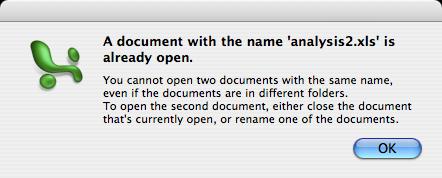
Not to point fingers (you can tell which application this is from the picture) but what a silly error message to get in the 21st century. Surely I don't have to modify my file system to keep the program happy (and what if I didn't have permission to change the names?).

The lesson here is that a filename is not a unique identifier, and this should be obvious.

Which made me think, are there any other error messages that shouldn't exist that you've seen in modern software?

Saturday, 27 August 2005

Know what I digg!

Get a flavour of what I'm into! If you have a JavaScript-enabled browser (most of them), I've added my ten latest diggs to the sidebar at the left. Now I noticed the sidebar is getting full, so I added some quick links to the top to save you scrolling.

This digg list gets updated as soon as I click, and appears only on the front page.

While I'm talking digg, if you're a digg-nut (is there an official term like slashdotter for diggers?) make sure you're watching (as well as listening to) diggnation the uncensored crazy summary of the top posts of the week. I'm getting right into podcasts. (Dialuppers, ZeroVerteX has started hosting diggnation audio so get it there!)

Thursday, 25 August 2005

Phone's crashing. Not good.

I was just writing a review of GMail and my new phone crashed and rebooted for the second time in two days.
Not good. Guess I'll have to type it again later. Suffice it to say you need GMail, those in the US can get it via SMS, otherwise I've got invites.

Sunday, 21 August 2005

My MythTV box odds and ends

I've been intensively updating my MythTV box this weekend thanks to the new card. Here's some tips that might help others.
1. If you change capture devices, don't modify the existing card, delete it and then add a new one.
2. The PVR series of cards can flag the aspect ratio of the source in the stream. This is set in the Recording Profiles frontend setup screen. I've now set up my card with extra profiles (I had to manually edit the database and patch MythWeb in order to achieve this) so that programs on widescreen channels no longer require me pressing W for the maximum quality.
3. DSMyth is pretty much mandatory for the Windows machines on the network, and thanks to the backend CPU being less busy recordings can stream from MythWeb.
Now more Gentoo-specific:
4. If you have your backend set to automatically switch off, and you want to update, make sure you have a shutdown check script which blocks on login shells, then (for bash) put ; exit after the command to run.
5. Be careful when updating. I managed to break ratpoison and php by updating readline. You can fix this by running revdep-rebuild after the update.
6. Always run etc-update to interactively update your config files after an update.

Saturday, 20 August 2005

Hauppauge PVR-150MCE (Australian) review

So I didn't think it would be that easy is a little bit of a cliche, but here it turned out to be true. Here I am using the card with Linux and MythTV. Installation was mostly a breeze, simply requiring compiling the latest development snapshot of ivtv and loading the module. I did encounter a problem during testing where I couldn't capture from the card but that was caused by a conflict with my old capture card. Removing the card fixed the problem. Getting the firmware was no problem either, I used the version on the CD I was supplied with and it's working fine (ivtv has warned that it is not the preferred version though). Initially the audio seemed pretty poor but I put this down to not having an active signal at the start of the test record. The sound and video quality is excellent and fully configurable on the fly in MythTV. Setting up MythTV was also largely no problem, though make sure you choose the correct default input. So far I am very happy with the card, and thanks to AusPCMarket.com.au for shipping it so fast.

Thursday, 18 August 2005

Xbox 360 Australia less than $500 and when?

Follow the link to see the prices Microsoft have announced for the release of the Xbox 360. It is interesting to see that they will launch with two price points. I think this comes down to meeting 'magic numbers' in price psychology in each territory.

I thought it would be an interesting exercise to see how these numbers convert into Australian dollars. Microsoft hasn't (and won't) say anything because I don't believe we're part of the simultaneous worldwide lauch (if someone can show me otherwise I'm interested). Everything I've read is North America/Europe/Japan by Christmas 2005.

This is complete speculation!

Taking these exchange rates on the prices quoted here leads to a price point of $394~$500 on the core system and $526~$667 on the 360 package. I haven't included GST here, so adding another 10% and aligning us with a higher weighting towards the US price suggests $449 is the price point Microsoft would aim for on the core package, keeping it below the psychological barrier of $500. However the 360 package would $599 at a minimum which justifies Microsoft's reason for choosing to offer a core package. Unfortunately the core package probably wouldn't be able to play Xbox games, lacking the hard drive, which severely limits its utility in my opinion.

Here's hoping our currency holds out, otherwise no next-gen console for you, .au shoppers, unless you have deep pockets :(

Wednesday, 17 August 2005

My next step for MythTV

So I've got remote set up. What's next?
Well I've given in and ordered a Hauppauge PVR150MCE Australian version. It's extremely difficult to find anyone who keeps these in stock. This is an MPEG2 encoder card, so it should reduce my CPU usage, improve the quality and allow me to use faster decoding on my Mac. Not asking for much am I? :-)

Follow up to remote controls

So I got the Xbox remote control working with MythTV.
Thanks to the Gentoo project for including the patches in portage to make it easy.
If you're following along, here's how I got it. Get the LIRC package, and tell it to compile the xbox driver.

LIRC_OPTS="--with-driver=xboxusb" emerge =app-misc/lirc-0.7.0-r1

Note that if you have an unofficial receiver you may need to patch the driver to include the USB vendor and product IDs of your device, which can be discovered by doing a lsusb.
Now plug in the receiver, it should get detected, check with dmesg. Now copy the xbox lircd.conf that Gentoo provides.
cp /usr/portage/app-misc/lirc/files/xbox.lircd.conf /etc/lircd.conf

Now start lirc and test it with irw.
/etc/init.d/lircd start

Assuming that all works, make lirc start automatically.
rc-update add lircd default

Now I set the remote for MythTV by making a lircrc file. Follow the instructions in the irxevent man page and the MythTV docs.
I also set up the computer to autologin to the tv account now and it's great, working well. Thumbs up to this remote control combination.

Tuesday, 16 August 2005

I dub thee my lowcasting god!

After my rant yesterday I came across a digg where someone is actually providing TWiT and Revision3 content in a dialup friendly way.

I just wish I found this yesterday, and that he keeps offering them - he's got TWiT and Systm up-to-date so go for it you low-bandwidth friends.

By the way I think a cool tag for this sort of content service would be lowcasting, a verb meaning the action of providing content in a low-bandwidth friendly manner :) Comments?

Thanks to ZeroVerteX for providing the files (too bad I didn't find out till today).

Monday, 15 August 2005

Frustrated by iTunes; podcasting

Let me vent a little here, some of this is a repeat of what I've said
before.

The podcasting revolution is leaving the low-bandwidth netizens among us
behind. Even iTunes 4.9 has serious flaws in its handling of podcasts in
low-bandwidth situations.

Some of the problems specific to iTunes include:
* Not being able to resume interrupted downloads. If my modem disconnects or
the connection times out, iTunes just assumes what its got is the lot
(obviously it's not and it has the contents of the RSS feed to verify this).
* Not being able to start playing a streamable format currently being
downloaded (I'd like to be able to preview podcasts but it's just not
possible on dial-up).
* Not indicating file size and estimated completion times when downloading.

What happened to the multi-bandwidth streams we used to get? (Apple for one
still provides them for movie trailers, etc) Can we do this for podcasting?
The answer is yes, but most podcasters don't have the time or want to do
this. Some providers do it -- This Week in TECH for example has a 32kbps
feed, but unfortunately it's not exposed to the iTunes Music Store and
requires BitTorrent (in my experience on dialup, downloading the low
bandwidth stream via BitTorrent feels like it takes just as long as
downloading the normal AOL Radio feed, probably because peers give up on me
and there were less seeds). RocketBoom also provides a mobile-phone
compatible service.

So do we need a third-party like the pod2mob beta to help us out -- they
stream podcasts to mobile phones that have an unlimited data plan. They do
give a nice idea -- how about using mobile phone codecs which are highly
efficient at low bitrates to provide a low bandwidth version?

This would have the added benefit of being promoted as a 'sync with your
cellphone' version of the podcasts, and reduces everyone's bandwidth
requirements. Contrary to some people's belief I don't need ultra-audio
quality on my podcasts (hey I listen to very poor reception AM radio the
rest of the week!)

Systm is another one of my favourites, *but* I'm downloading (small, h264)
at a rate of about 5 minutes of real content for every 3 hours of
downloading which is too slow.

Content providers please take heed! The best solution would be an
enhancement to iTunes RSS which added a low-bandwidth tag to the feed and a
check box in iTunes for 'Prefer low-bandwidth content'.

FYI as an example Systm Episode 1 using QuickTime I can compress down to
about 6MB (MPEG4/AMR/streamable) and likewise Diggnation Episode 1 also 6MB
(it's a longer clip, AAC/streamable). And they're still tolerable.

Tuesday, 9 August 2005

HOWTO: iSync and Address Book for the Sony Ericsson K608i

Now that I have my phone set up for Bluetooth, I hacked my Mac OS X Tiger 10.4.2 to support the phone (using the well-published techniques from macosxhints.com).

If you have a Bluetooth-enabled Tiger Mac and a Sony Ericsson K608i, download the files from my website and follow the instructions below:

  1. To add support to iSync, make a new folder called PhonePlugins in your /Library folder.

  2. Put SonyEricssonK608i.phoneplugin.zip in this new folder.

  3. Double-click the .zip file to extract its contents into the folder. You can now delete the .zip file.

  4. To add support to Address Book, choose Go to Folder... from Finder's Go menu.

  5. Enter /Applications/Address Book.app/Contents/Resources/Telephony.bundle/Contents/Resources and click Go.

  6. Either open ABDeviceCommandSets.plist in Property List Editor and find K700 (in my version this is at Root/2/ABDeviceModelStrings/0), click it, click New Sibling and type K608. Save and close the file.

  7. Or download the ABDeviceCommandSets.plist.zip file, and extract it into that folder.

  8. Re-pair your phone from the Bluetooth menu extra. You should get the option to use iSync and Address Book.


Let me know if you use the files I provide, I hope they're useful.

Calling all Bluetooth hackers!

I can now do almost everything fancy with Bluetooth and my Mac, including
iSync, Address Book SMS and dialling, remote control and file transfer.

Can someone *please* write a program that allows me to use my iBook's built
in microphone and speakers with my Bluetooth-enabled mobile phone as a
handsfree kit? Or point me in the direction if such a program exists.

It just seems a little odd that I can click a phone number in Address Book
and have it dial but I have to pick up the phone to talk...

Search for a cheap MythTV remote control

For a long time I have been looking for a remote that's trivial to set up with my MythTV frontends. My criteria have been must be cheap, and must work with Mac and Linux. Currently I'm using an RF keyboard, but I barely get 1 metre out of it so it's got to go!
My first remote control was the Packard Bell Fast Media Remote that I got from eBay back when I was using myHTPC. This worked okay under Windows using WinLIRC and likewise would under Linux. However it fails the Mac test because I don't have a serial port on the Mac. Also the receiver is passive and I couldn't get the mouse to work.
The next option was a PS2 to USB adapter for the PlayStation DVD remote I already owned. This works well with both Linux and Mac but you can only use the bottom half of the remote because the adapter firmware only exposes game controller functionality.
Before you ask, I already had a video capture card which didn't offer a remote, so that option failed the cheap test. Likewise I saw the ATI Remote Wonder which has drivers for all 3, but I have yet to see it cheap or in a store.
Recently I purchased a Smart Joy 10 so I could use Xbox accessories. Then I found a cheap clone DVD remote and receiver. Now I know this works on the Mac but I had trouble chasing down a Linux driver for kernel 2.6. Today Andrew on the mythtv-users mailing list pointed me in the right direction.
Is my search over? We'll find out later in the week.

Sony Ericsson K608i (3 Australia)

On Saturday I got the brand new Sony Ericsson K608i mobile phone from 3 Australia. Here is my review, written and sent from said phone. (Edit: Combined parts 1 and 2)
Appearance
It's a very compact candy bar style phone, a little thicker than my previous NEC e313, but much smaller overall. The buttons are slightly raised and work okay even though they are small. The blue backlighting is very nice. Unfortunately I find the volume buttons on the side too small to press. The decision to go with a horizontal layout with dedicated shutter button works really well. 3 have customized the phone, putting access to the Planet 3 online service on both the side button and the home screen, I feel this is unnecessary duplication.
Features
This is the most feature-rich phone I've ever used, it has everything in the box. The camera is fine, it has an FM radio which works perfectly as long as you carry the handsfree, and it plays most content - music, video, Java games. Crucially for 3 users it accepts all of this content over e-mail. The only downside is that it is not expandable - 33MB available which is plenty for online content but not to use as a portable media player.
User interface
The phone's interface is very friendly, and the joystick is very nice to use. It is a bit cramped compared to what I'm used to, mainly due to the use of the bigger font size. The bigger font does have the benefit of making things easier to read. In fact this is the first phone I've been able to use in all lighting conditions, including direct sunlight. The screen will wash out in such light but maintains readability. As far as text entry, which is very important, it offers T9 with a customisable dictionary. This is fast even when typing long emails with symbols. The phone offers a horizontal mode in the file manager, media player and camera. Special mention of the horizontal aka full screen media player which makes viewing video a pleasure.
Connectivity
Firstly if you live in a marginal reception area this is not the phone for you. It tends to prefer to roam sooner than my old phone did, and there doesn't seem to be a quick way to switch back nor disable roaming. (There also seems to a limitation to the length of e-mails you can type.) Bluetooth support is excellent, connecting with my Mac. The file transfers are great, as is Sony's unique built-in remote control. The USB support isn't for the Mac and may crash your computer, though there is no real reason to plug it in since it doesn't support charging. I did also manage to crash the phone a couple of times via Bluetooth.
More thoughts
The shortcuts features are very nice, the alarm block works and the themes are the best I've seen on a phone. (Note that K750 themes are compatible with this phone.) Also Sony provides the best Java support, including optional APIs and only requiring JAR files making adding games a breeze. My midlets that I wrote for the Nokia 3530 still work which is impressive. Sony also provides tools on their developer portal for the Mac, so I plan to start developing for my phone again, something I couldn't do for the NEC.
Conclusions
This is an excellent phone and I can recommend getting it. Especially if you are a fan of candy bar phones. No real limitations except for the lack of expandable memory.

Monday, 18 July 2005

Screen capture on the Mac...

Apple's being a little devious now! While trying to take that screen shot that I blogged below, I had to close my DVD Player, even though I wasn't taking an image of the entire screen! (For what it's worth, I chose Window) A message pops up saying you must close the DVD player before taking a screen shot. Even the keyboard shortcut simply chimes at you (thought I had the wrong keyboard shortcut).

Bad show guys... least the DVD Player application remembers where it was up to now.

I never thought I'd see it!


No news on digg! Probably a glitch...

Oh well - to quote a cliche, no news is good news, means I can get more work done!

(And I get to test the Blogger Images feature... great work guys!)

Sunday, 19 June 2005

Quartz Composer HOWTO now on quartzcompositions.com

My Analog Clock bit of fun (see earlier post) has been copied onto the quartzcompositions.com website, which contains more information on Quartz Composer and the fun things you can do with it. Thanks to the site admins for their interest in my blog post!


Direct link to the howto

Sunday, 5 June 2005

Foxtel Digital STU and MythTV

One of the most common things I get asked for is the settings I use to control the Foxtel Digital STU from MythTV. Well, since the set top unit is almost directly compatible with the Sky Digibox used in the UK for a longer time than Foxtel Digital in Australia, we go to them for the remote codes. The link in the post header has the remote codes (click the 'hand-tuned LIRC config file' link) that I use successfully.

However note that the codes use the Sky terminology for the buttons (which you could change), for example the FOXTEL button = SKY, BACK = BACKUP, and our SETUP button = their TEXT.

Hope this helps.

Friday, 3 June 2005

On the feasibility of internet media

So you might have noticed I've been getting sucked into the revival of downloadable legal media on the Internet. But I've got some complaints to make.
Compression codecs and computer performance is increasing, bandwidth of consumer connections however are not (discounting when those swapping dial up for broadband out of desperation).
Why then are media producers not making smaller files? I downloaded systm the other week and even the h.264 small version is 86MB! For what turned out to be a 10 minute clip! In my opinion this is too big for a small version. My tolerance level for download times is decreasing (explaining the rise and rise of Bittorrent). I think that about 2 times the length of the clip is an acceptable medium (meaning you invest three times the length of the clip of your time -- contrast this with traditional media, where live TV is 1x, a recording you chose to make is 2x and a PVR with commercial skipping is less than 1x the length of the clip). I concede that podcasting software, like PVRs bring down the number but your Internet connection is consumed, unless it can be told to update when the connection is not in use.
Now I know it is possible to get the content to fit in with this ratio, even for those on dial up. Rocketboom, a video Blog, offers a mobile phone version at http://www.rocketboom.com/port And I watch Call for Help on my mobile. Now I encode that at 88kbps, which suits my ratio nicely at 44kbps working for most 56kbps modem users and up.
Don't get me wrong, please still offer your content in high quality for those who are willing to wait, but please make a smaller option available for the rest of us.

For tech goods, try eBay

eBay is the best place for tech stuff. So cheap! Granted, most is shady imports, but who can argue with 30%+ off after shipping? (Rate based on my purchases of memory cards, and a firewire enclosure.) It's still a case of caveat emptor, let the buyer beware, but if you need it or want it bad enough and you can't get it retail, give it a shot. It's not so good for software though, for games especially prices aren't competitive (great for the sellers though).